Giving Your Yampa AI Agents a Computer of Their Own
Today we’re making Computer Use Environments generally available in Yampa. Computer Use Environments are a way for Yampa’s AI agents to do the things your customer support team does every day on their work computers, through a graphical user interface.
Until now, Yampa agents acted essentially through APIs and our connectors library: your SaaS CRM, help desk, knowledge sources, and anything else with a clean integration. Computer Use Environments extends that reach into the long tail of tools that don’t expose APIs but only a graphical interface, such as legacy web portals and complex partner software: any kind of tool your team uses to handle the most complex processes.
What it looks like in practice
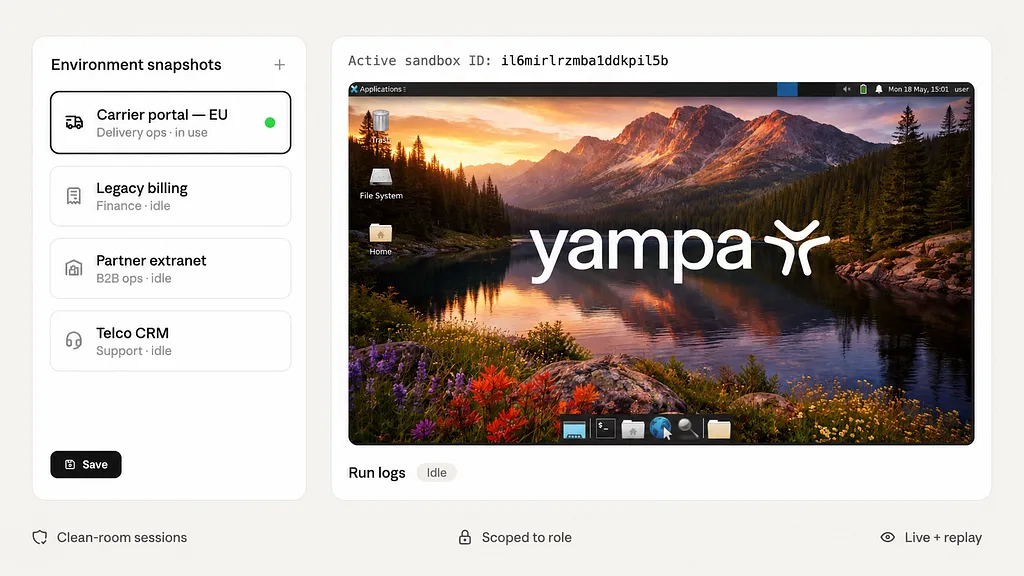
If you need to give your Yampa AI agent the ability to help on customer deliveries, you set up a computer use environment in advance dedicated to your agent, scoped to its role and the processes it must handle. Concretely, you connect to a virtual computer desktop, log in to your delivery carrier portal, and prepare the environment as you would for a newly onboarded human operator. This dedicated environment is then saved as a secured snapshot.
Later, when a customer calls about a delayed package, your Yampa AI agent talks with your customer to clarify the request, creates a new computer use session from your snapshot library, logs into your legacy carrier portal, finds the tracking number, gets the latest status, and tells the customer where their package is.
At any time, you can edit your saved Environment Snapshots, and replay past sessions to monitor your agents’ fleet.
Built for the things you care about
- Security: every task runs in its own clean room. When an agent needs a computer, Yampa creates a fresh, isolated session from the snapshot you defined, and throws it away when the work is done. No leftover cookies, no stale logins, no shared files between customers. Each task starts clean and ends clean.
- Role & process boundaries: each agent only sees what it needs. An environment snapshot can be created to perform a specific task, match a specific role in your organization, or handle a dedicated process you defined. It has access only to the credentials and tools that the task, role, or process requires. Nothing more.
- Live & replay monitoring: you watch your agents work. Every session streams its screen live into the Yampa interface. Your supervisors see exactly what the agent is doing. When something goes wrong, you see the full screen recording, not the final error.
- Full integration in the Yampa platform: you add computer use abilities directly to your agents and sub-agents. Computer Use Environments aren’t a separate product: it’s a new capability inside the Yampa orchestration engine you already use.
What’s unlocked
On a daily basis, most teams perform tasks that are simple for a human but become almost impossible for an API-only agent, because the systems involved either don’t expose APIs, or sit behind locked contracts and certifications that can take months to negotiate when you deploy your processes on the Yampa platform.
With Computer Use Environments, the agent doesn’t need to wait for this API to exist: it uses the same screen, the same software, and the same login your team uses. If a human can do it on a computer, your Yampa agent will do it too.
We’re rolling this out to all Yampa customers starting today, and working closely with our design partners on the next wave of improvements.
If you’re building serious customer care automation, we’d love to talk.